 fikaride
If you want to watch the actual road wind up a mountain, start with ROUVY. If you want a rendered bike game you can open in a browser, try Fikaride. Both can put a route in front of your trainer. What you see on the screen is quite different.
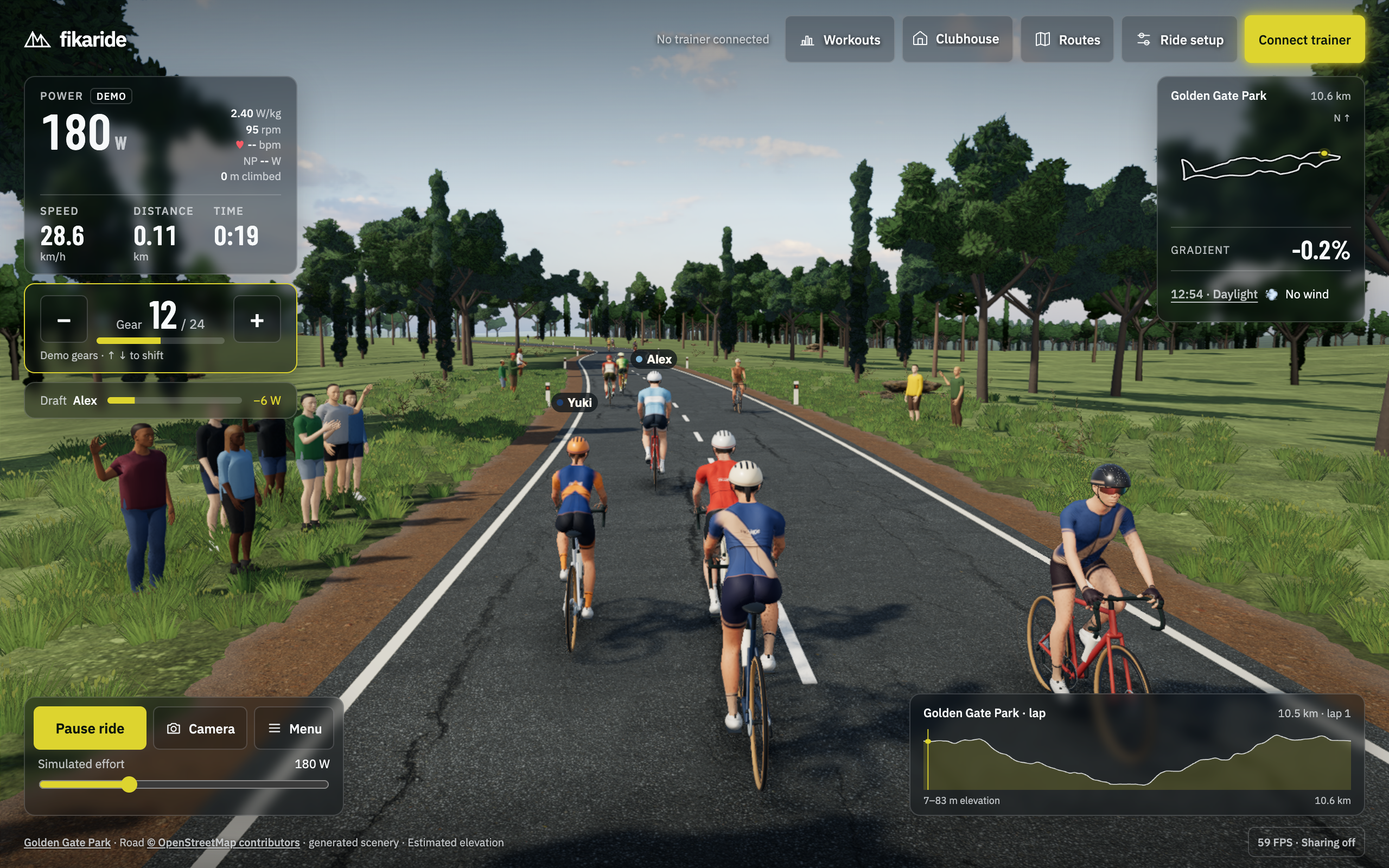
I make Fikaride, a game that draws its world in 3D. ROUVY uses filmed roads with virtual riders added to the picture. ROUVY’s video environment
“Real route” doesn’t mean the same picture
A road can follow a real route without showing you a film of the place. That’s Fikaride: route and elevation data underneath, game scenery around it. The name on the route picker doesn’t mean every building and tree has been recreated exactly.
With ROUVY, looking at the place is part of the attraction. If you’re curious about a climb you might visit, check its catalogue for the exact route and direction. The road video can show you what’s ahead; it won’t teach you what a wet corner feels like. ROUVY’s routes
Fikaride is for the days when you want to get on the trainer and ride through a game. There are scheduled virtual riders, local pacers and nearby live riders, and you can save a ride without making an account. Fikaride’s multiplayer is shared road presence; it doesn’t yet offer a friend picker, organised group rides or live races. ROUVY has group rides and races as part of its subscription. ROUVY plans
| What you want to know | Fikaride | ROUVY |
|---|---|---|
| What’s on screen? | A rendered 3D world | Road footage with virtual riders. Display guide |
| Where do I run it? | Desktop Chrome or Edge to connect your trainer | Supported Windows, Mac, iOS/iPadOS, Android and Apple TV devices. Requirements |
| Can I do a workout? | Built-in workouts and file imports | Workouts and training plans. Plan features |
| Will my trainer work? | Bluetooth FTMS; limited physical testing so far | Check the model and its limitations in the trainer list |
| Can I prepare for bad Wi-Fi? | Browser assets need to load; desktop edition unfinished | Download route videos, subject to offline-access limits. Offline guidance |
If your bike lives where the Wi-Fi doesn’t
Downloading the road before a ride is useful. ROUVY supports that, and its documentation allows short periods offline. It still needs to refresh login credentials periodically and recommends staying connected. A downloaded video isn’t a promise that the app will run forever without its service. ROUVY offline conditions
Fikaride’s desktop edition is being developed, and its access terms aren’t settled. The browser game is what you can try now. Don’t buy a pre-sale expecting a finished offline download today.
For either app, there are two useful checks: can you finish this ride when the connection drops, and can you start another ride tomorrow? They aren’t the same question.
What will it cost?
On 19 October 2026, ROUVY’s English pricing page quotes USD 19.99 monthly or USD 179.99 billed annually for Single, which covers one rider. Duo covers two and Group covers up to five. Those are the website’s USD quotes; check your checkout currency, tax and total. The annual monthly-equivalent figure isn’t a monthly payment plan. ROUVY pricing
New users get a seven-day trial after entering payment details, with billing afterwards unless cancelled. It includes AR routes and events; non-AR routes and outdoor activity imports are excluded. There’s also a 20 km per month free option, which is useful to know about if you only want an occasional ride. Trial terms, free access
Fikaride currently lets you ride free in the browser. Its paid support options are separate. If you want ROUVY’s filmed scenery, though, free access to a different kind of game may not be the thing you’re looking for.
Use the screen and trainer you already have
An Apple TV or tablet may make ROUVY the simpler starting point: it has native apps for supported models. Its requirements explicitly exclude Chromebook and Android TV. Use desktop Chrome or Edge to connect your trainer to Fikaride. A webpage opening on your phone doesn’t mean it can talk to your trainer. ROUVY device requirements
I have a KICKR CORE, which is the trainer I’ve tested. Fikaride’s current shifting, controller and heart-rate support still needs broader physical testing, so check your setup before spending money on new equipment. Fikaride device guidance
Questions
Is one more realistic?
ROUVY shows footage of the place. Fikaride renders it. That answers the scenery question, but it doesn’t establish which app feels more like riding outside. This article doesn’t claim a head-to-head test of their physics or trainer feel.
Will Fikaride run better on my laptop?
I can’t promise that. Open the demo on the machine you’ll use. The rendering article explains improvements within Fikaride, not a performance comparison with ROUVY.
If the screenshot looks like somewhere you’d like to spend a ride, give Fikaride a go. If you’re mainly looking for people to ride with, read Fikaride vs Zwift. The app guide covers the wider choice.
Facts checked 19 October 2026 against the shipped Fikaride browser app and official ROUVY sources. This is Fikaride’s comparison, not a hands-on ROUVY review.